A Google Business Profile can help boost your website's SEO, attract new customers, and build the credibility of your business. On top of all that it's free! Let's take a look at what it is and how to create one for your business.
If I had a penny for every time I use Google to find something on the internet I would be a wealthy woman!
Apparently, the average person uses it 3-4 times per day! (1) Searching for something on Google has become such an integral part of life that 'Google' was added to the Oxford English Dictionary as a verb in 2006. (2)
Other search engines are available but Google is still the most used, with over 9 billion searches every day (1).
So, it's worth spending a few minutes to make your business more visible on Google searches.
What is a Google Business Profile?
Google Business Profile used to be called Google My Business and I'm sure you've seen the profiles when searching on Google.
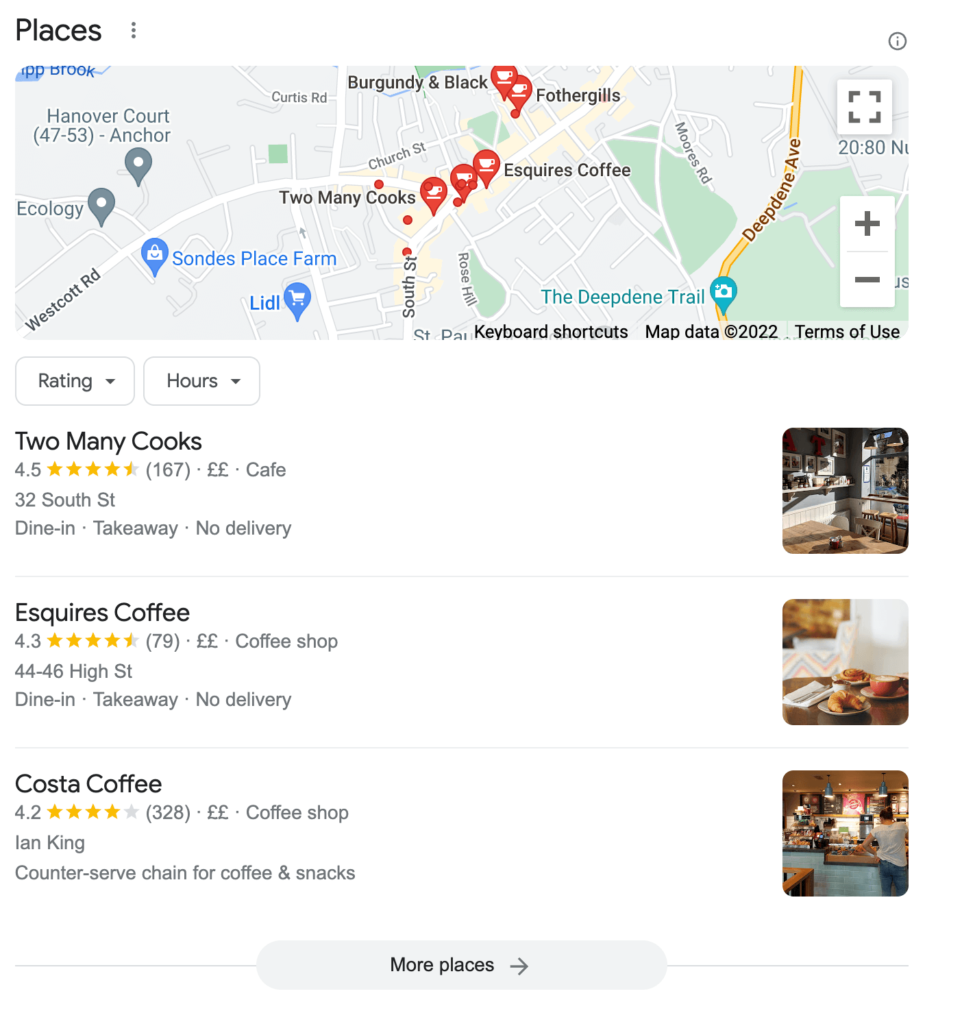
For example, if you search for a 'cafe in Dorking' on Google, you're presented with a map highlighting cafes in the area, with a selection of options, and a summary of information and reviews. This all appears before the main search results:
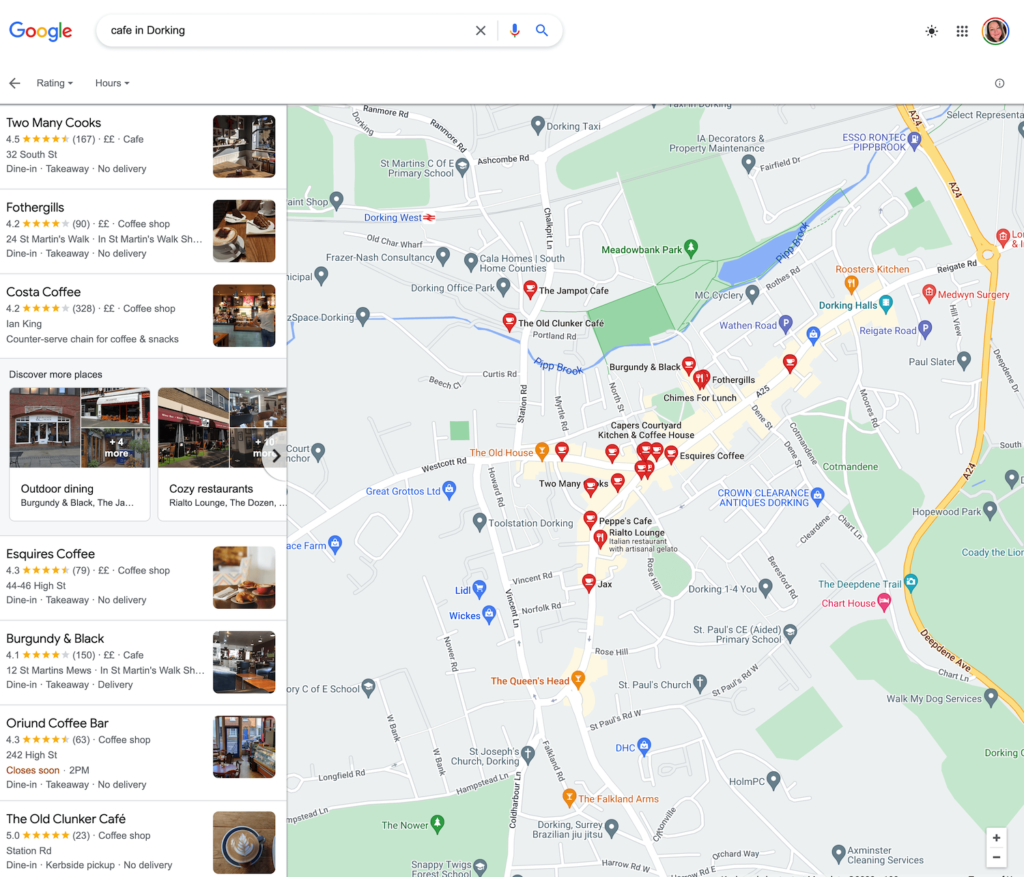
You can then click on "More places" to view a larger map and more cafes:
Each of the cafes highlighted, with a pin on the map showing their location, is a Google Business Profile. Once created, anyone searching on Google can find your business on the map quickly, rather than having to search through the results.
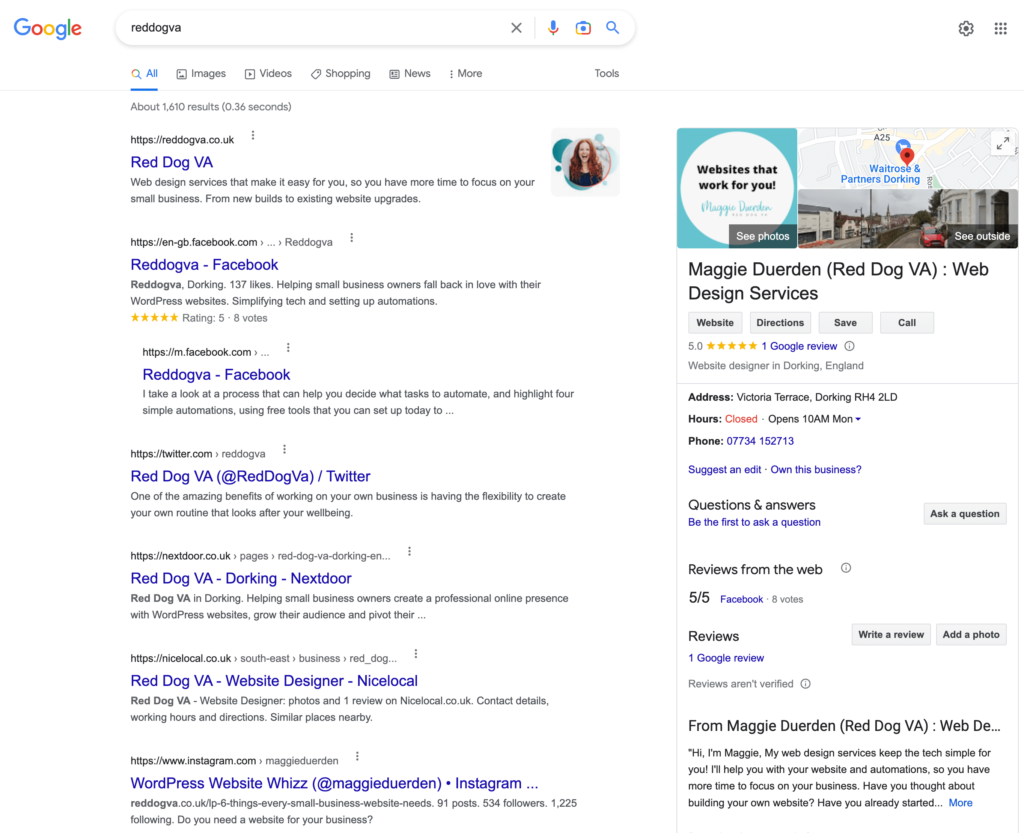
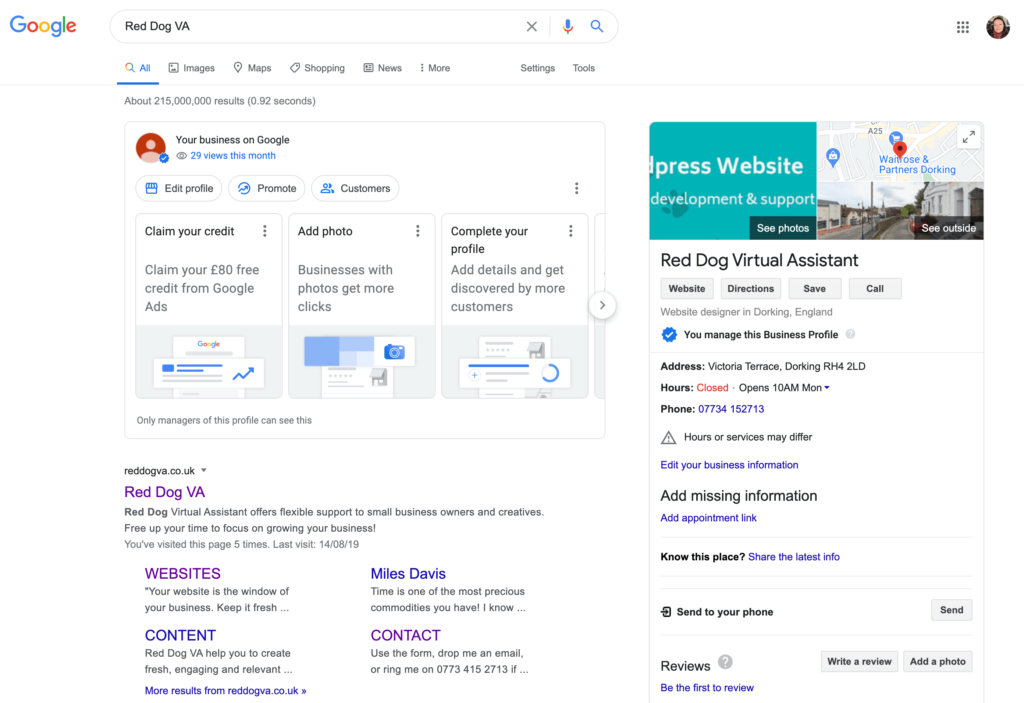
Also, if someone 'Googles' your business name, they can see a useful summary on the screen with your business details and a link to your website, as well as any search results:
How to create a Google Business Profile
It only takes a few minutes to create your profile. The first step is to sign in to your Google Account. If you don't have an account, you can follow these step-by-step instructions to create a Google Account.
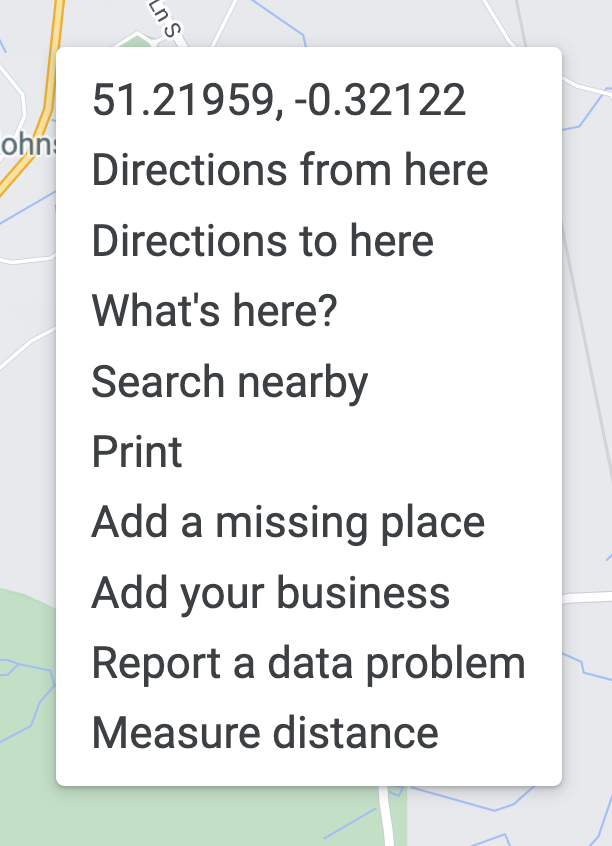
Then open Google Maps and search for your address. Right-click on the map and select "Add your business" from the menu.
Follow the on-screen instructions to finish signing up for your profile.
If your business is already shown on the map, you can click "Claim this business" to claim the listing, then follow the on-screen instructions to verify your claim. This will give you access to update the listing.
Personalise your Google Business Profile
Once your Google Business Profile has been created and verified, you can personalise it with essential information about your business. For example, you can add:
Contact information
Opening hours
Your website link
Photos
Product or service information
You can add a myriad of other useful information to your profile and even manage your five-star reviews. Take a look at this useful blog from Search Engine Journal that shows you how to optimise your Google Business Profile.
A Google Business Profile isn't a replacement for your website, but it is an excellent compliment that can help boost your website's SEO, attract new customers, and build your business's credibility.
Four simple steps to improve your Small Business SEO (20 minute read)
I've been using Small Business SEO a lot recently to find keywords for my new website and social media marketing. So, I thought this would be the ideal time to share my SEO process with you.
These four Small Business SEO steps can help you find topics for content your target audience will find useful, and can improve your search engine ranking (how high up in the search results you appear)!
Step 1 - Research
Step 2 - Content Creation and On-Page SEO
Step 3 – User Experience
Step 4 – Google's Tools
Why SEO is important for small businesses?
SEO (Search Engine Optimisation) can be quite a 'dry' subject, so before we get stuck into the steps it's important to understand how useful it is!
What is SEO?
The Beginner's Guide to SEO describes it as the practice of increasing both the quality and quantity of website traffic, as well as exposure to your brand, through non-paid (also known as "organic") search engine results. (1)
Who doesn't want more FREE visibility and traffic?!
I know from experience it takes a lot of time, energy and/or money to create quality content for your website and marketing materials, SEO can help you get more 'bang for your buck'.
If you optimise your content and website, it can help you appear higher on relevant search engine results. There's a lot of information available on how you can improve your ranking (where you appear in the results) and this is the basis of SEO.
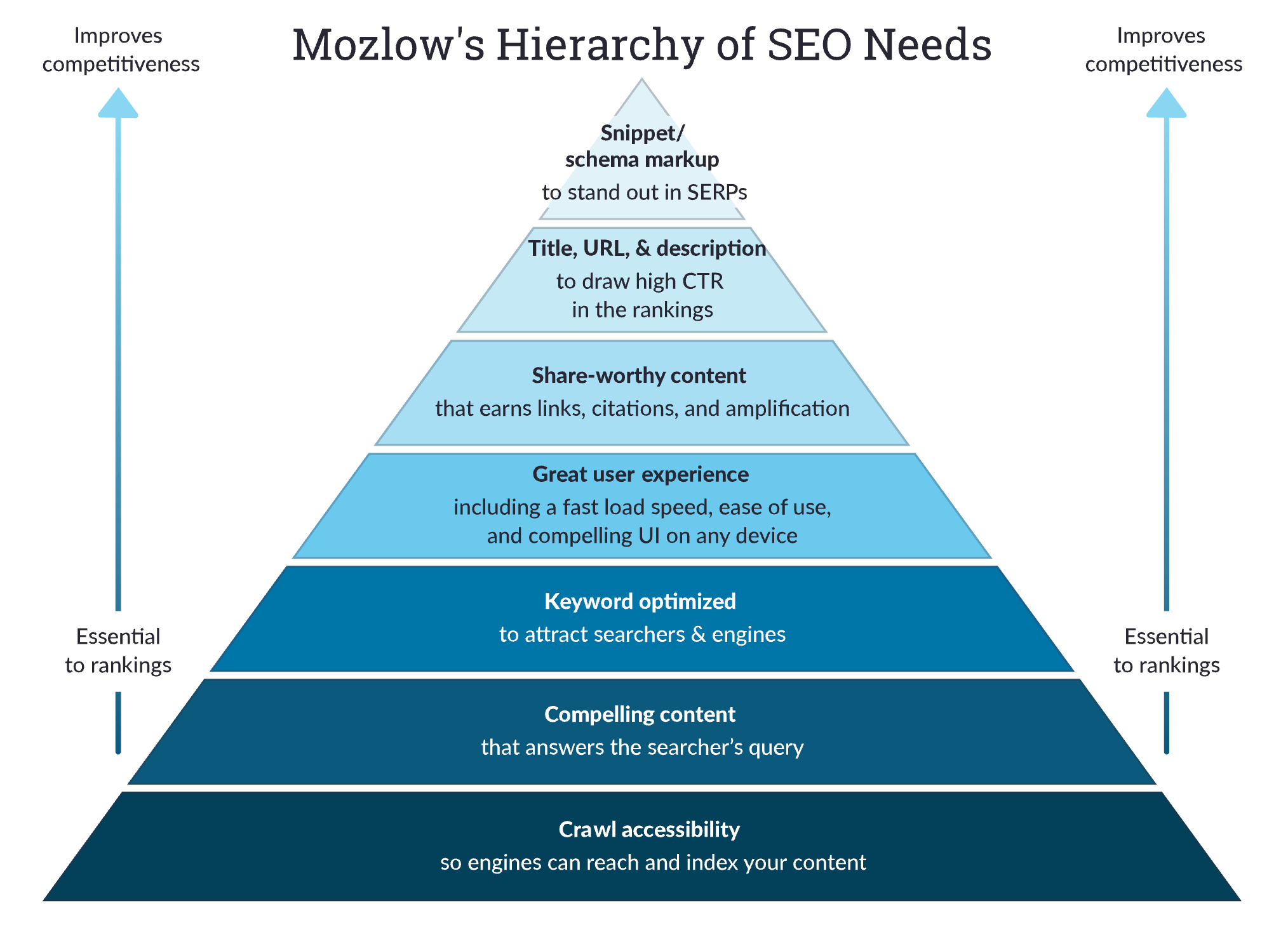
This pyramid (similar to Maslow's Hierarchy of Needs) shows a summary of the most important SEO steps. (2)
What is a search engine?
Wikipedia describes search engines as software systems designed to carry out web searches (Internet searches), which means to search the World Wide Web in a systematic way for particular information specified in a textual web search query. Search results are generally presented in a line of results, often referred to as search engine results pages (SERPs). (3)
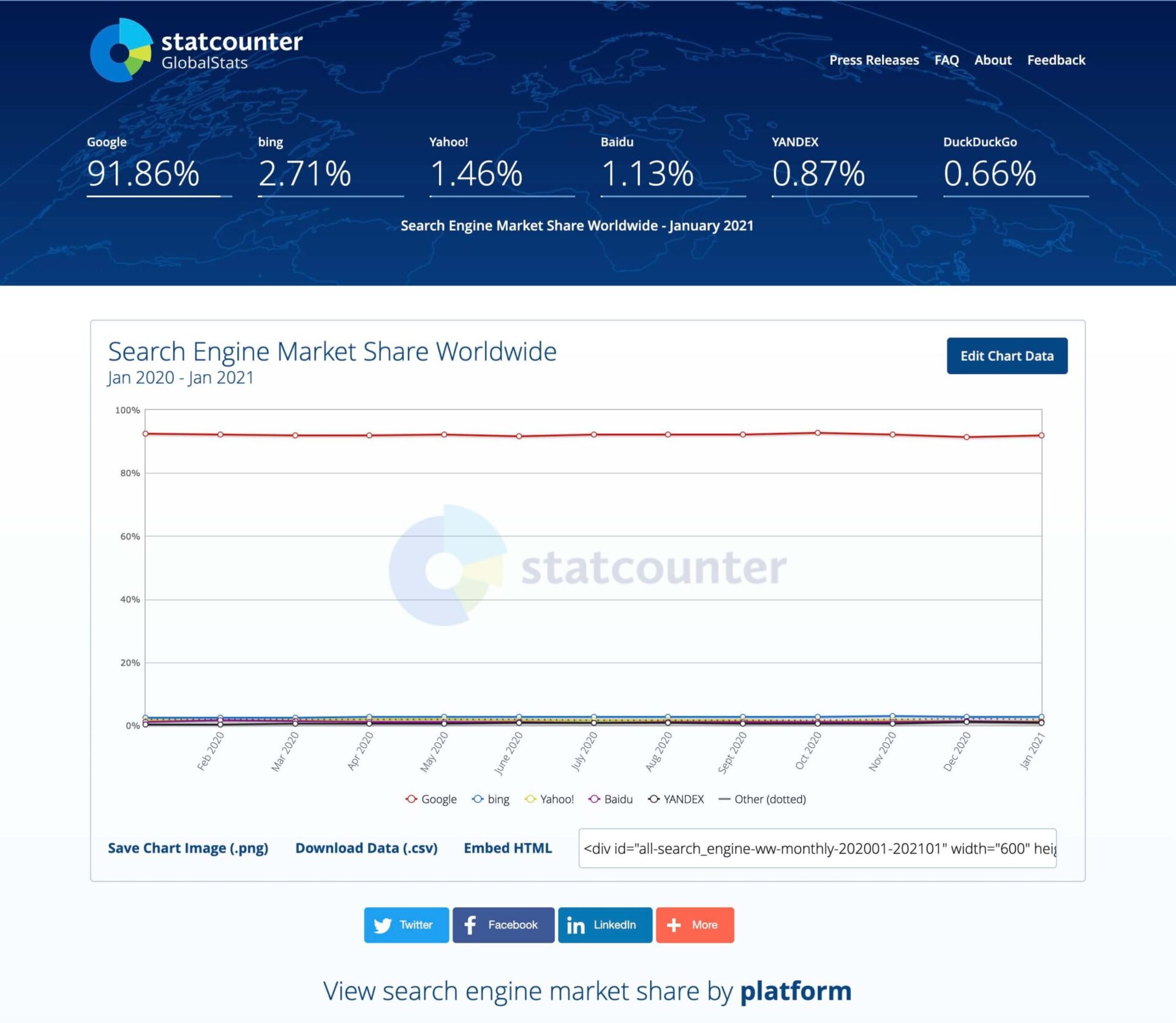
Google is the most popular search engine used, with over 91% of the market share according to statcounter.com. (4)
In fact Google is so mainstream that it's often used as a verb for performing a search, how often have you said, or heard:
I'll Google it?
In this blog, we're going to be looking at optimising our content using advice and information from Google.
How does SEO work ?
Google aims to serve the most relevant and useful answers to anyone performing a search. To do this it analyses every web page to try to understand it, and stores this information in a giant Google Index, a huge database stored in many, many (many!) computers. (5)
Even though we're optimising our content for Google to index, one of the most important factors in SEO is understanding your audience, and what they're searching for when they're looking for your product or service.
If you create useful content answering their queries, Google will rank you higher so your audience will be able to find you.
The more quality content you produce to serve your audience, the higher you rank. It's a virtuous cycle.
It is harder to get organic views these days, which is why SEO is such big business. There are plenty of SEO experts you can hire to help you out, and there are lots of paid tools that can help too. A quick search on Google for SEO should bring up the best SEO companies (as they'll be great at SEO).
But, you don't have to hire an expert or pay for SEO tools to make a start on improving your SEO. There are simple steps you can do yourself and lots of guidelines that can help.
Benefits of SEO
It's useful to have a basic understanding of SEO because it can help you learn more about your target audience. This can help you:
create products they need
share information to help them
create marketing that engages them
It certainly is worth spending a bit of time learning about SEO and trying out some tactics for a return on investment (ROI) like that.
Here are the four Small Business SEO steps I use for my own business, and recommend to my clients, to optimise websites and marketing materials.
Step 1 - Research
Before you start writing your website text, blogs, or marketing materials, it helps to find out what your ideal customer is looking for when they're searching for your service or product, what questions they have, and what words they use.
Research can help you decide what content is important to have on your website, and it's fantastic for finding ideas for blogs and social media posts.
You can do this by asking your existing customers, searching on social media, and by researching keywords.
It's always worth having a look on online communities (Facebook, Instagram and Quora for example) to find questions and issues that are getting a lot of engagement.
I always recommend that my clients also do keyword research into their industry, as it can help you understand your audience.
Quick keyword research guide
The first step in keyword research is to think about your business or topic and jot down several words that your audience might use to search for it. For example, for this blog I wrote down SEO, Small Business, Websites, Marketing, Traffic and Keywords.
I'm going to take you through a practical example of how I used Keyword Research to narrow down a title for this blog on SEO.
I was initially thinking of a title along the lines of:
Small business tips for SEO
How to do simple SEO for your business
Simple DIY SEO for your business
How and Why to do SEO for your business
Four step solution to SEO for small businesses
To give this blog a fighting chance of being found by people who are looking for advice on Small Business SEO, I needed to choose a good keyword to use in my title and throughout my blog.
Answer The Public
AnswerThePublic.com is a great website to find out what people have been searching for on Google. It's also free to do a couple of searches a day and is the first place I go to get keyword inspiration.
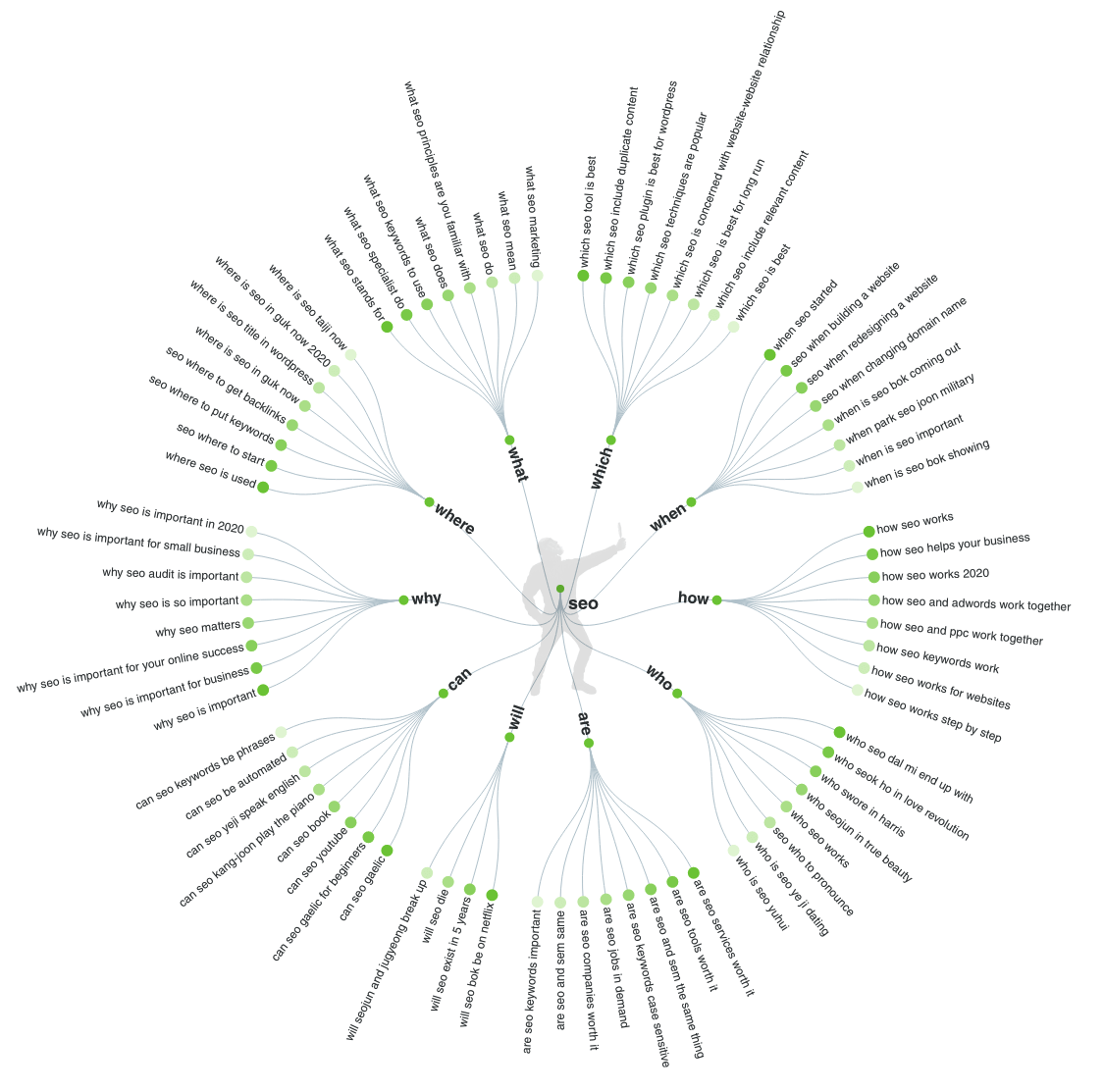
Type in your keyword, click search and it gives you several spider diagrams of Google searches related to that keyword.
I searched for SEO and, as you can see, this diagram alone is packed full of ideas for social media or blog posts:
This sparked several ideas and I decided to use Why SEO is important for small businesses as a sub-heading in this blog.
My favourite keyword from this report was SEO for small business so I made a note of that. It's short, sweet and does what it says on the tin.
I also downloaded the keywords into a .csv file to analyse and refer to later.
Google's Keyword Planner
I wanted to do a bit more in depth research to find out the Monthly Traffic and competition for each keyword.
I used Google's Keyword Planner for this. You need a Google Ads account to access the Keyword Planner but you don't need to be running any ads, and it's free to use. There's a useful blog here that shows you how to use it.
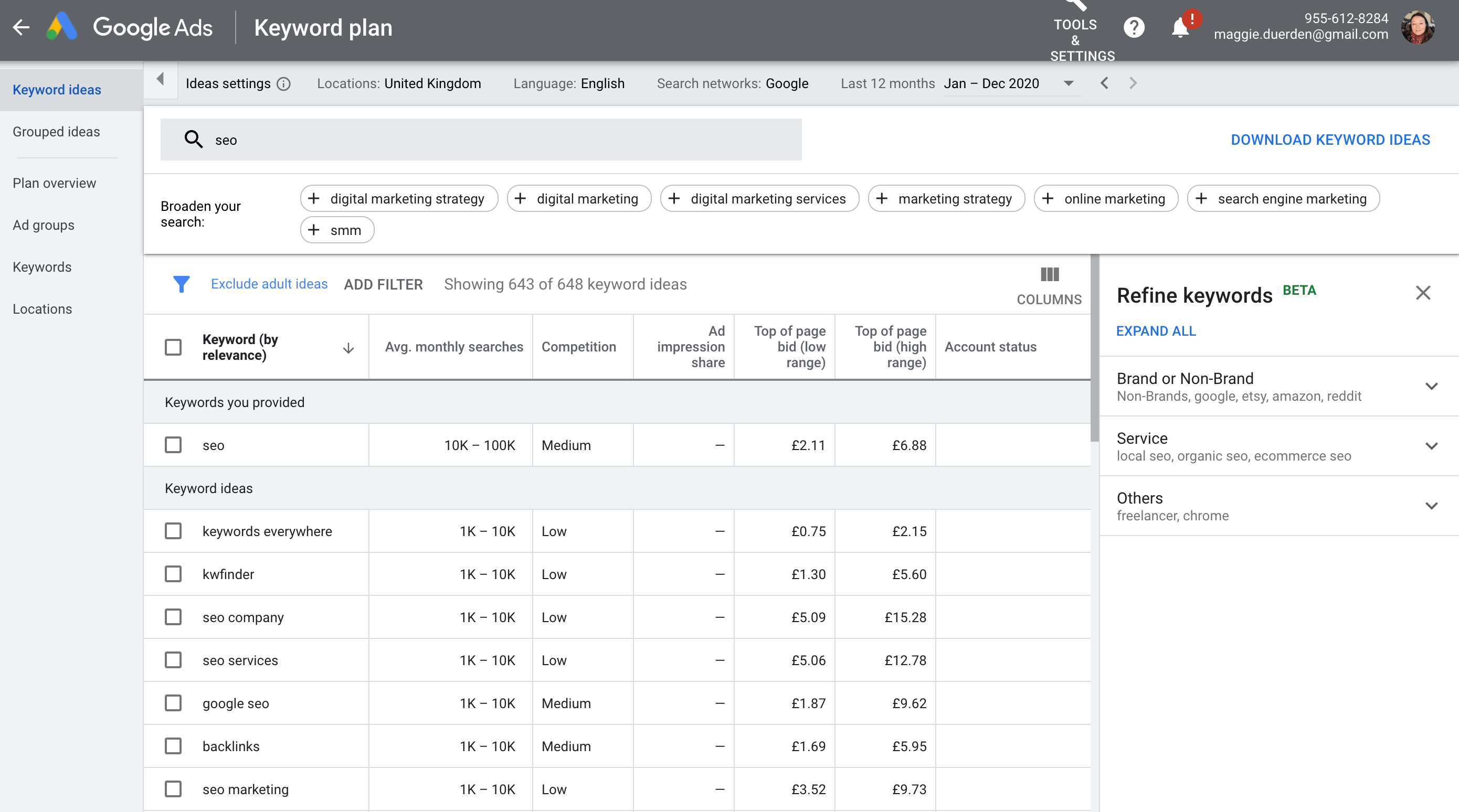
I ran a search for SEO in Google's Keyword Planner and it came up with 648 results. This keyword planner shows the average monthly searches and competition for each keyword.
I also downloaded these results into a .csv file to analyse the results.
I wanted to find keywords that have a relatively good number of monthly searches, and low competition, because it may be easier to rank for that keyword in Google.
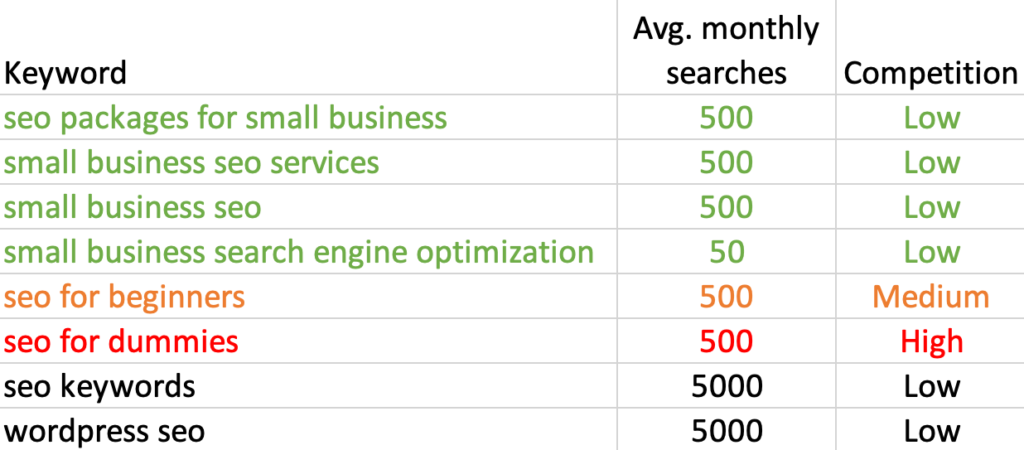
I looked through the keywords and picked out the ones most relevant to this blog. I then colour coded them with a traffic light system of green being the best for this blog, orange being not so good because they're harder to rank for, and red and black being the no gos.
WordPress SEO initially looked like a good keyword to use as it gets 5000 average monthly searches and has low competition.
But, when I searched for WordPress SEO in Google, the results showed WordPress website specific SEO Plugins and tutorials by some of the big players in WordPress. That keyword wasn't specific enough for this blog.
I liked SEO for beginners but it had Medium competition so would be hard to rank on Google.
My preferred keyword from this list was Small Business SEO, it's more specific to the audience I'm writing this blog for, and describes the content.
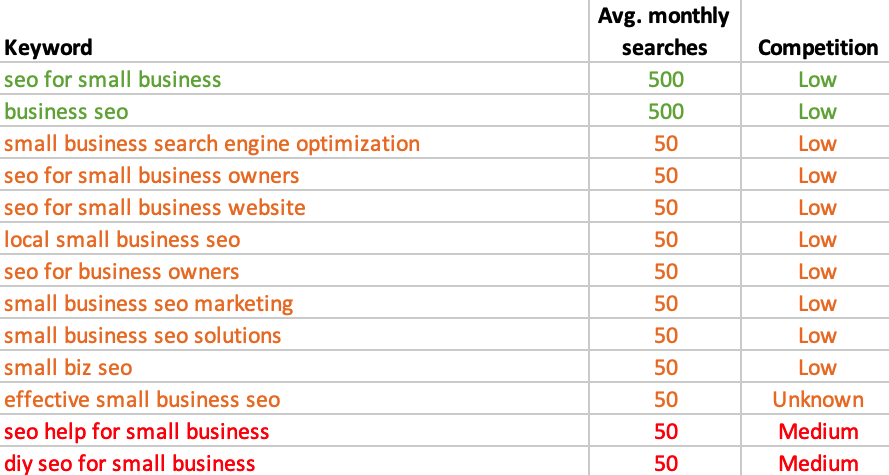
These searches don't take long so I dived back in with a search for SEO for small business,which was my preferred keyword from the Answer the Public search.
This time it came up with 71 keywords and the results were much more specific to my audience and blog.
After downloading the results into a .csv file and sorting through them, I ended up with a shortlist of 13 keywords that would suit my blog.
I colour coded them again with my favourites in green, orange being the next best because of a lower number of average monthly searches, and red being harder to rank for.
My favourite from this list was SEO for small business which had the same number of average monthly searches as Small Business SEO, so either of them would be good to use as my keyword for this blog.
I combined both these results into one master list that I've saved, along with the Answer the Public information for future use. It's really useful to build a database of keyword shortlists for your business that you can refer to quickly when writing social media posts and blogs.
This keyword research process helped me confirm there is an audience for this subject, and decide on a keyword to use for this blog, Small Business SEO, which should give it a better chance of being found in a Google search.
There are many other free, and paid for, tools that can be used to find and analyse keywords. I've popped links to some of the most popular at the end of this blog, but I find these quick searches give me plenty of information for discovering keywords for my business, websites and marketing.
Step 2 - Content Creation and On-Page SEO
Once you've decided on the keywords you want to use for your website or your business marketing, it's time to put that information to good use by creating useful and interesting content for your audience.
Content
Google advises that creating compelling and useful content will likely influence your website more than any of the other factors discussed. Users know good content when they see it and will likely want to direct other users to it. This could be through blog posts, social media services, email, forums, or other means. (6)
Try to write in plain English, using short paragraphs, so your content is easy to read. This not only makes it easier for your audience, but also easier for Google to Index.
Google doesn't like it if you use lots of keywords on one page. They say that it's sometimes helpful to have a few descriptive terms in the title, but there's no reason to have the same words or phrases appear multiple times.
A title like "Foobar, foo bar, foobars, foo bars" doesn't help the user, and this kind of keyword stuffing can make your results look spammy to Google and to users. (7)
I use the keyword research process to find the best one or two keywords for the content and then focus on them.
As a rule of thumb I use the main keyword in:
the title
the first and last paragraphs
a short URL for the page
H1 and H2 headings if it makes sense to
This process also helps focus your mind on the keyword when writing your blog or page which keeps the content relevant.
Meta Page Titles and Meta Descriptions
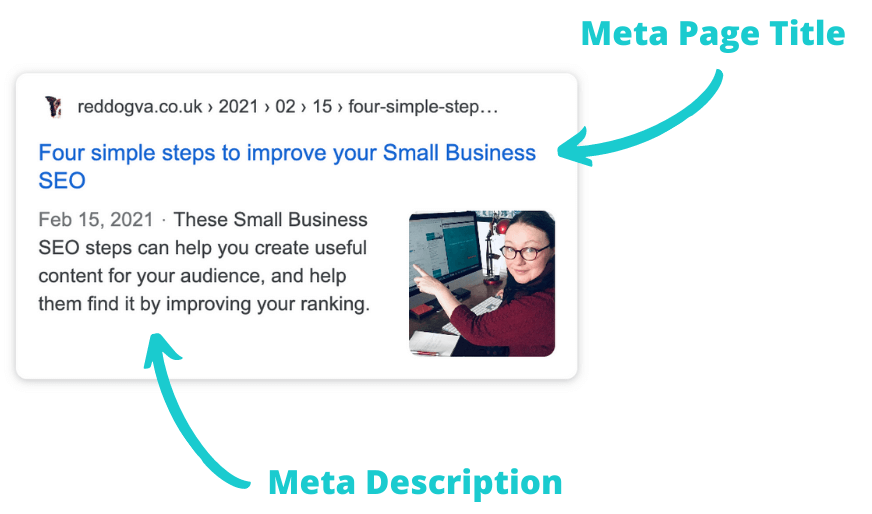
The meta page titles and meta descriptions are the titles and short descriptions that appear in Google searches.
We can use these to help Google understand and index your page content, this also helps with general website accessibility, and gives people searching on Google more information to encourage them to click your link.
Google will automatically create a meta description based on the first test on your page. It's better to write a short meta description that includes your keyword and describes the page content.
You can add that meta description, along with a keyword optimised meta title, using the WordPress plugin, Yoast SEO.
Click here for more information on adding key phrases and meta descriptions in Yoast SEO.
Optimise your images
Large images can slow down your website loading speed, so it's important to compress and size your images before loading them onto your website.
When you have chosen the images you want to use, you can upload them to tinyjpg.com to reduce the size of your .png or .jpg files considerably, without losing quality!
Then reduce the dimensions of the image to fit your content, I usually reduce them to a maximum of 1500 pixels wide.
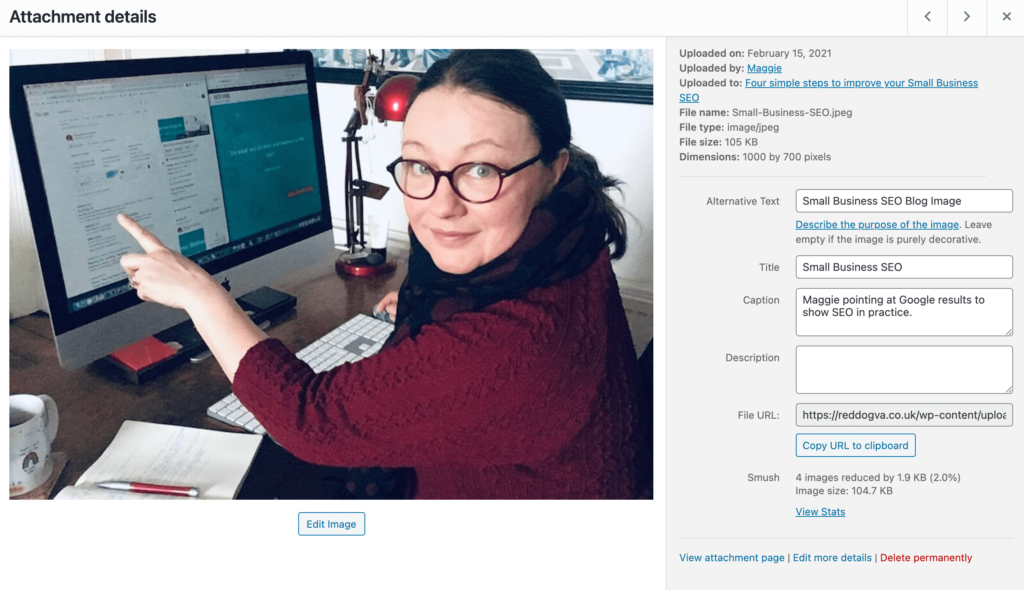
Once the images are uploaded to your website, find them in the media library and you'll see an option to add Alternative (Alt) text.
This Alt text enables Google to read the description and, if a user is viewing your site using assistive technologies, such as a screen reader, the contents of the Alt attribute provide information about the picture to them. (8)
Step 3 – User Experience
Another key aspect to improving your SEO is UX (user experience). Google want us to make it really easy for visitors to find the information they want from our website, on any device.
Navigation
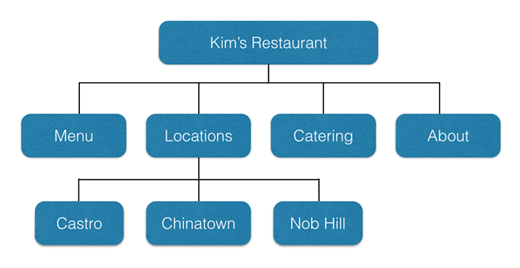
The first step is to have a clear navigation structure which helps visitors quickly find the content they want. Check your menu structure makes sense and you have links to relevant information throughout your website to help your visitors.
Example website structure
Your site structure also helps search engines understand what content the website owner thinks is important. (9)
There's a useful blog here that explores website structure further.
Mobile Friendly
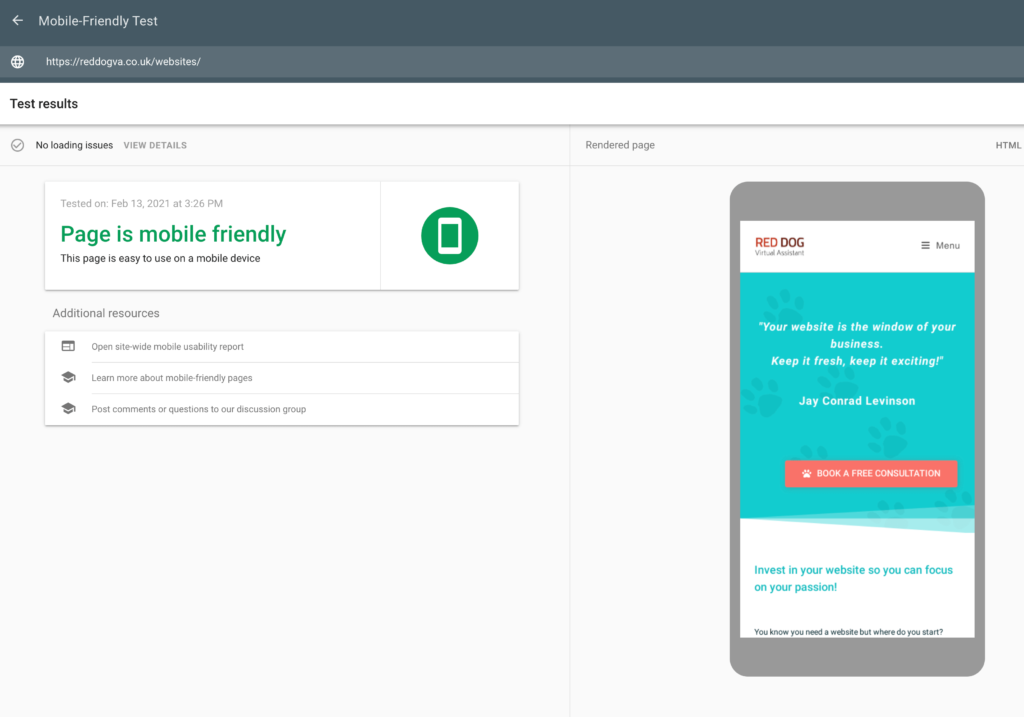
A website that is responsive and easy to read on a mobile, tablet or desktop is essential, and should be considered when building your website and writing your content.
Making your content easy to read with clear headings and short paragraphs will help your visitors if they're using a mobile device.
You can test if Google views your website as mobile friendly by using their mobile friendly test .
Speed
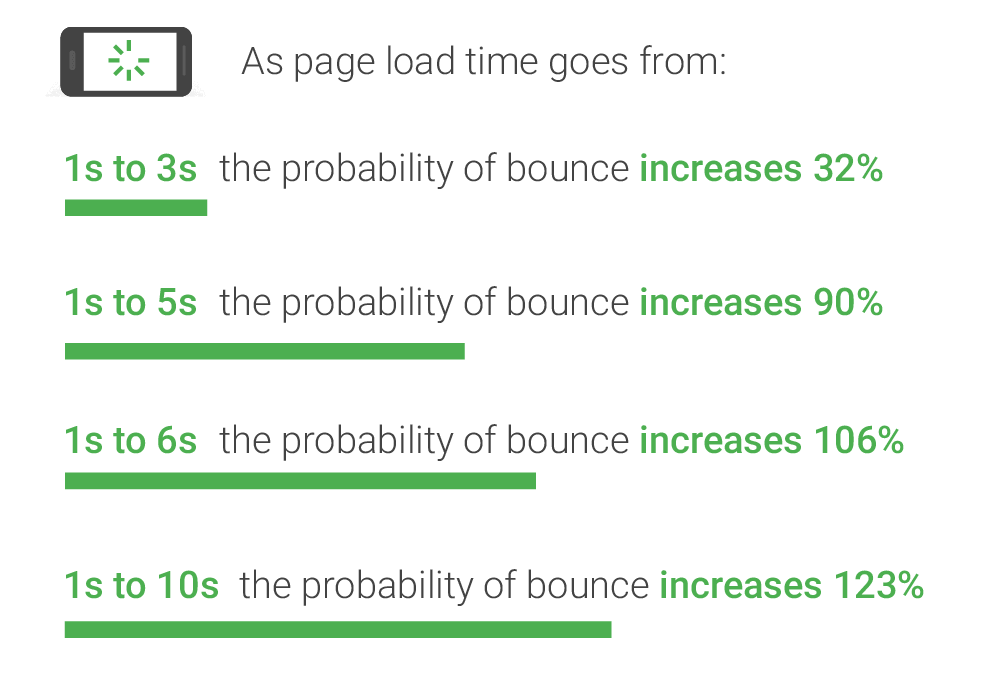
Nobody likes to be kept waiting when searching for an answer. A study by Google found that 53% of visits are abandoned if a mobile site takes longer than three seconds to load.
This research also found that 70% of the mobile landing pages they analysed took more than seven seconds to load. (10)
There are several factors that can affect the loading speed of your website, including hosting, file sizes, large images, page rendering etc.
If your results show that your web page is loading slowly, both Google and GT Metrix recommend steps you can take to improve your loading speed.
It's worth running the test a few times to get an average time, as the results can vary due to several external factors such as network speed and server performance.
I like to regularly monitor my site's average time and see if I can improve it.
Step 4 – Use Google's Tools
It helps to connect with Google, if you want Google to find you.
Google Business Profile
Set up a Google Business Profile here. The profile is free and easy to maintain. You can add your business details, get found on a map in Google Searches and connect your website.
Google Console and Google Analytics
Once you have created your Business Profile with Google, login and connect your website to Google Console and Google Analytics. You can use Google's own plugin Google Site Kit to set this up.
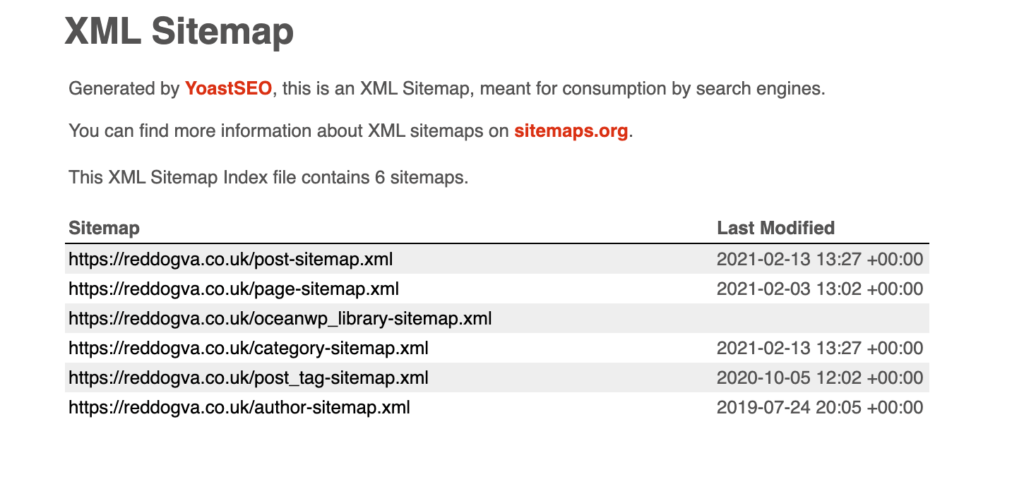
Then create a sitemap of your website and submit it to your Google Console account. This will help Google index your website. The Yoast SEO plugin automatically creates a sitemap for this purpose.
And finally, track your website's performance using the Google Console and Analytics. Google recommend using the Google Site Kit to:
Review the main dashboard on a weekly basis and check for any significant changes in how people are finding your site. Are people finding your site from a new place?
Keep track of how your recent posts are doing by checking the individual page reports.
Compare the top performing pages and how people found them. Is a particular topic or product attracting more visitors from social channels?
Set up new Google services to get more interesting insights — for example, if you enable PageSpeed Insights and Analytics, you'll be able to see whether page load time affects bounce rate. (11)
Learn More About SEO
These four simple steps will get you far in improving your SEO but it's only the tip of the iceberg for Small Business SEO (did you notice the keyword?!).
There is a massive rabbit hole that you can fall down on this subject and I'd recommend reading up a bit more on SEO when you have the time to understand the principles and find more tips that you can implement.
Google is a great place to start as it's coming direct from the horse's mouth, but you can also find loads of great free training online to get you started.
Here are a few of my favourite free online SEO resources:
I really enjoy using these techniques to find ideas for content and I hope they will be as much use to you too!!
Sign up to receive my monthly memo if you’d like top tips on websites and WordPress, plus any useful and inspirational tips I come across each month that may help with your business!
Happy optimising! 😊✨
References
Extra reading if you fancy delving down further into the research.
We use cookies on our website to give you the most relevant experience by remembering your preferences and repeat visits. By clicking “Accept”, you consent to the use of ALL the cookies.
This website uses cookies to improve your experience while you navigate through the website. Out of these, the cookies that are categorized as necessary are stored on your browser as they are essential for the working of basic functionalities of the website. We also use third-party cookies that help us analyze and understand how you use this website. These cookies will be stored in your browser only with your consent. You also have the option to opt-out of these cookies. But opting out of some of these cookies may affect your browsing experience.
Necessary cookies are absolutely essential for the website to function properly. These cookies ensure basic functionalities and security features of the website, anonymously.
Cookie
Duration
Description
cookielawinfo-checbox-analytics
11 months
This cookie is set by GDPR Cookie Consent plugin. The cookie is used to store the user consent for the cookies in the category "Analytics".
cookielawinfo-checbox-functional
11 months
The cookie is set by GDPR cookie consent to record the user consent for the cookies in the category "Functional".
cookielawinfo-checbox-others
11 months
This cookie is set by GDPR Cookie Consent plugin. The cookie is used to store the user consent for the cookies in the category "Other.
cookielawinfo-checkbox-necessary
11 months
This cookie is set by GDPR Cookie Consent plugin. The cookies is used to store the user consent for the cookies in the category "Necessary".
cookielawinfo-checkbox-performance
11 months
This cookie is set by GDPR Cookie Consent plugin. The cookie is used to store the user consent for the cookies in the category "Performance".
viewed_cookie_policy
11 months
The cookie is set by the GDPR Cookie Consent plugin and is used to store whether or not user has consented to the use of cookies. It does not store any personal data.
Functional cookies help to perform certain functionalities like sharing the content of the website on social media platforms, collect feedbacks, and other third-party features.
Performance cookies are used to understand and analyze the key performance indexes of the website which helps in delivering a better user experience for the visitors.
Analytical cookies are used to understand how visitors interact with the website. These cookies help provide information on metrics the number of visitors, bounce rate, traffic source, etc.
Advertisement cookies are used to provide visitors with relevant ads and marketing campaigns. These cookies track visitors across websites and collect information to provide customized ads.