

What is SSL? How to protect data entered on your website
Your website is an amazing asset for your business. It can work as your assistant, taking messages and arranging appointments for you. It can collect and add email addresses to your mailing list and it can even take orders and payments for you.
All these functions require the visitor to enter their data on your website. Did you know that any information entered on forms on your website could be intercepted by a hacker if your website is not secure?
Hubspot explain that this "interception" is often referred to as a "man-in-the-middle attack."1
You have a responsibility as part of the UK GDPR (General Data Protection Regulation) to make sure that any data entered on your website is encrypted and secure.
So, how do you do this?
How to ensure any data entered on your website is secure
The ICO's Guide to GDPR recommends using HTTPS across your entire website2. This can be implemented by adding an SSL certificate to your website to protect your data and enable secure online transactions.
There are other benefits to having an SSL certificate on your website. Google also encourages their use and shows this warning on any website that doesn't have a current SSL certificate (on Google Chrome):
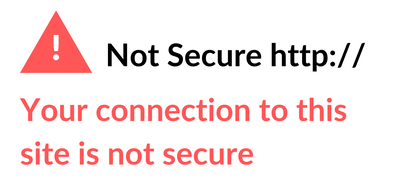
If a visitor to your website sees this warning, it can damage the reputation of your business and limit the traffic to your website. In fact, GlobalSign found that 85% of online shoppers will avoid unsecure websites3.
In contrast, when you have a valid SSL certificate on your website, your visitor will see a green padlock that shows the website is safe and secure.
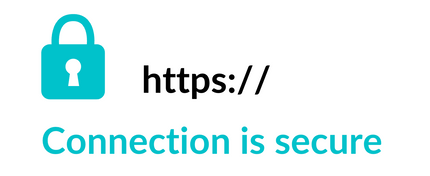
I know which I'd prefer to see!
Google has also stated that it gives preferential treatment to websites using the HTTPS protocol (websites with a valid SSL Certificate). So, not only are you securing your visitor data but you are also giving yourself a leg up in the search engines.4
What is SSL and how does it work?
The Hubspot blog describes SSL as a protocol for servers and web browsers that makes sure that data passed between the two are private.5
The SSL certificate protects any data transferred between the visitor's browser and the website's server by encrypting it.
Google explain that this encryption disguises the data and lessens the chance that your information is viewed or manipulated.6
Entrust describe SSL certificates as digital passports that provide authentication to protect the confidentiality and integrity of website communication with browsers.7
The illustration below from WPBeginner shows how it works.
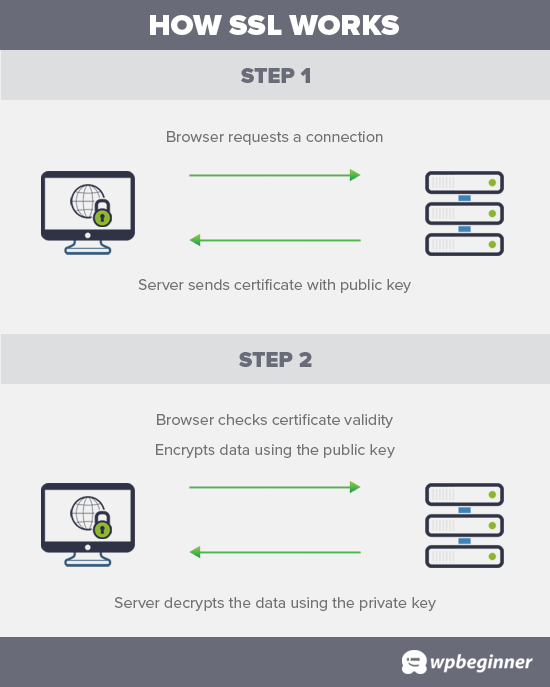
How SSL works to protect data transfer9
When a user visits a website, their browser first verifies if the website’s SSL certificate is valid.
If everything checks out, then the browser uses the website’s public key to encrypt the data. This data is then sent back to the intended server (website) where it is decrypted using the public key and a secret private key.8
By ensuring that all data passed between the two parties remains private and secure, SSL encryption can help prevent hackers from stealing private information such as credit card numbers, bank information, names, and addresses.10
How to tell if a website has SSL?
You can easily check if a website is secure by clicking on the little padlock next to the URL. If it has a valid SSL certificate you will see the message "Connection is secure" and you can use the website confident in the knowledge that your data is safe.
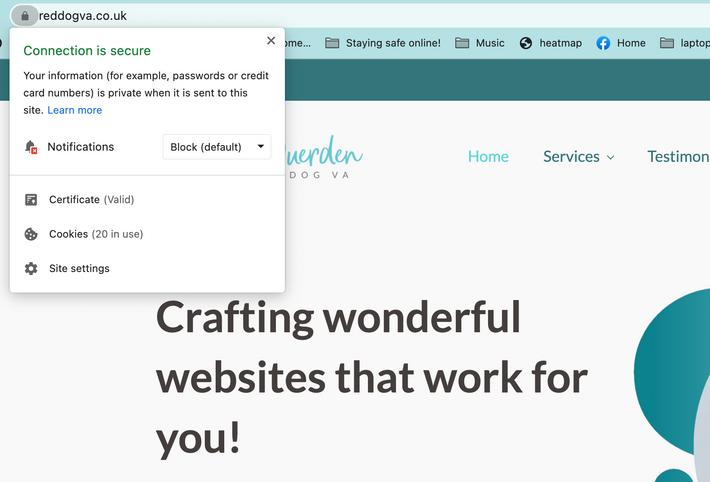
If you click on the URL you'll notice that it starts with https:// which is another indication that it is secure.
If the website does not have a valid SSL certificate, you'll see the message "Your connection to this site is not secure" and your data will not be protected.

If you click on an unsecure URL you'll see that it starts with http:// - it is missing the 's'.
You should proceed with extreme caution on websites that have a Not Secure label, and WPBeginner recommend that you do not give them any personal information.11
How to to get a SSL certificate for your website?
If you have checked your website and you don't have an SSL certificate installed on your website you need to contact your web host company.
Most hosting packages include a free SSL certificate, but a few offer them as a paid-for extra. You may be able to change your hosting package to one that does include a free SSL certificate.
You may even be able to request a free SSL certificate from Let's Encrypt and install it yourself. Let’s Encrypt is a free, automated, and open certificate authority (CA), run for the public’s benefit. It is a service provided by the Internet Security Research Group (ISRG).12
There are different types of web servers, and each has its own process for installing and updating SSL/TLS certificates. You will need to find out which web server your website is using and follow its instructions for installing and updating your certificate.13 Your hosting company will be able to help you with this.
Once your SSL certificate is installed on your website, you need to make sure that your website is loading using the HTTPS protocol. The Really Simple SSL plugin does that automatically by fixing the URLs when the page loads.14
I hope this blog helps to explain what an SSL certificate does and how to make sure that your website is secure, but please get in touch if you have any questions or would like help adding SSL to your website.
Sign up to receive my monthly memo if you’d like top tips on websites and WordPress, plus any useful and inspirational tips I come across each month that may help with your business!
References
Extra reading if you fancy delving down further into the research.
- A Beginner's Guide to SSL: What It is & Why It Makes Your Website More Secure
- Encryption | ICO
- 21 SSL Statistics that Show Why Security Matters so Much in 2021
- Free SSL Certificates By Let's Encrypt Comodo - Eco Hosting
- A Beginner's Guide to SSL: What It is & Why It Makes Your Website More Secure
- Use Hypertext Transfer Protocol Secure (HTTPS) on your domain - Google Domains Help
- How Does SSL Work?
- How to Get a Free SSL Certificate for Your Website (Beginner’s Guide)
- How to Get a Free SSL Certificate for Your Website (Beginner’s Guide)
- What is an SSL certificate?
- What is a SSL Certificate (and Why You Need One) - Beginner's Guide
- About Let's Encrypt - Let's Encrypt
- Use Hypertext Transfer Protocol Secure (HTTPS) on your domain - Google Domains Help
- How to Get a Free SSL Certificate for Your Website (Beginner’s Guide)